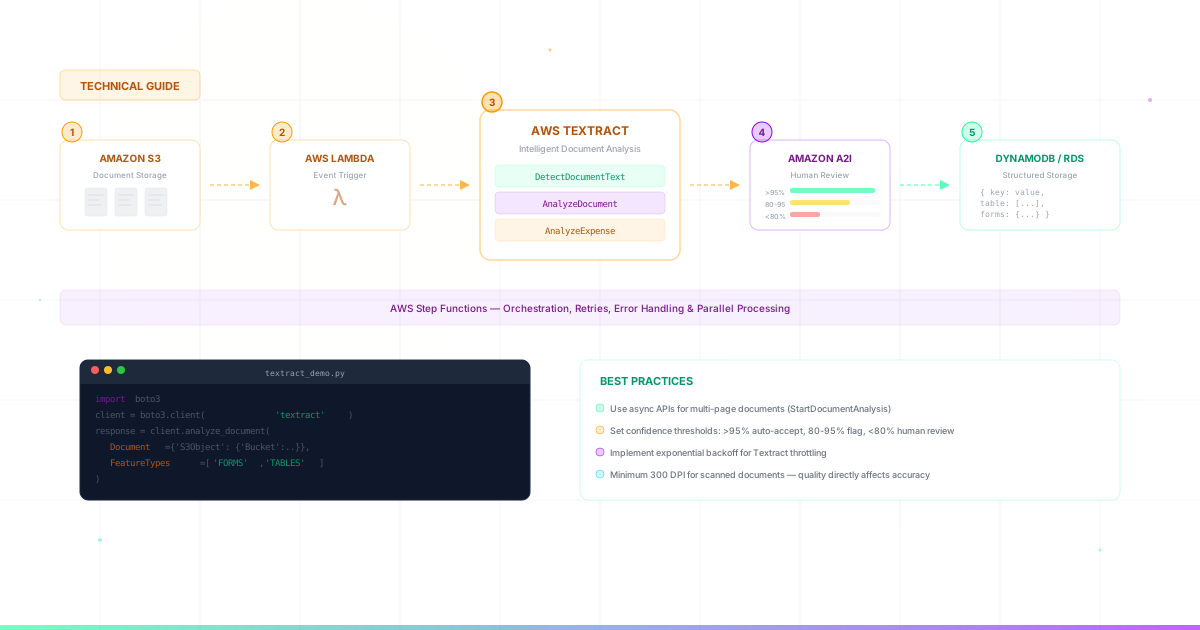
A comprehensive guide to implementing AWS Textract for intelligent document processing, based on our experience building production systems for Fortune 500 companies.
AWS Textract is a machine learning service that automatically extracts text, handwriting, and data from scanned documents. Unlike traditional OCR, Textract understands document structure—identifying forms, tables, and relationships between data.
At Horus Technology, we've implemented Textract-based solutions for clients like Bank of Montreal, Ford Credit, and Ricoh. This guide shares the architecture patterns and best practices we've learned.
When to Use AWS Textract
Textract excels at:
- Forms with key-value pairs – Loan applications, tax forms, insurance claims
- Documents with tables – Invoices, purchase orders, financial statements
- Mixed content – Documents combining printed text, handwriting, and checkboxes
- High-volume processing – Thousands of documents per day
Consider alternatives if you need:
- Simple text extraction from clean PDFs – Use Amazon Comprehend or basic PDF libraries
- Complex reasoning about document content – Combine with Amazon Bedrock
- Real-time processing of video/streams – Use Amazon Rekognition
Textract API Options
Textract offers three main APIs:
1. DetectDocumentText
Extracts raw text and word bounding boxes. Best for simple text extraction without structure.
import boto3

client = boto3.client('textract')
response = client.detect_document_text(
    Document={'S3Object': {'Bucket': 'my-bucket', 'Name': 'document.pdf'}}
)
2. AnalyzeDocument
Extracts forms (key-value pairs) and tables. Best for structured documents.
response = client.analyze_document(
    Document={'S3Object': {'Bucket': 'my-bucket', 'Name': 'form.pdf'}},
    FeatureTypes=['FORMS', 'TABLES']
)
3. AnalyzeExpense
Specialized for invoices and receipts. Automatically identifies vendor, line items, totals.
response = client.analyze_expense(
    Document={'S3Object': {'Bucket': 'my-bucket', 'Name': 'invoice.pdf'}}
)
Architecture Pattern: Production Document Processing
For production workloads, we recommend this architecture:
Component Flow
S3 (Input) → Lambda (Trigger) → Step Functions → Textract (Async) → SNS → Lambda (Process Results) → A2I (If needed) → DynamoDB/RDS (Store)
Key Components
1. S3 for Document Storage
Create separate buckets for input documents, processed results, and failed documents:
company-documents-input– Raw uploaded documentscompany-documents-processed– Extraction results (JSON)company-documents-failed– Documents that failed processing
2. Asynchronous Processing
For documents over 1 page, use async APIs:
# Start async job
response = client.start_document_analysis(
    DocumentLocation={'S3Object': {'Bucket': 'bucket', 'Name': 'doc.pdf'}},
    FeatureTypes=['FORMS', 'TABLES'],
    NotificationChannel={
        'SNSTopicArn': 'arn:aws:sns:us-east-1:123456789:textract-complete',
        'RoleArn': 'arn:aws:iam::123456789:role/TextractRole'
    }
)
job_id = response['JobId']

# Later, get results
result = client.get_document_analysis(JobId=job_id)
3. Step Functions for Orchestration
Use Step Functions to handle retries, parallel processing, and error handling. This is critical for production reliability.
4. Human-in-the-Loop with A2I
Route low-confidence extractions to human reviewers using Amazon A2I. This is essential for maintaining accuracy in critical workflows like loan processing.
Best Practices
1. Handle Confidence Scores
Every Textract extraction includes a confidence score (0-100). Set thresholds based on your accuracy requirements:
- >95% – Auto-accept
- 80-95% – Flag for review
- <80% – Route to human reviewer
2. Optimize for Cost
Textract pricing is per page. Optimize costs by:
- Pre-filtering documents that don't need OCR
- Using DetectDocumentText for simple extractions (cheaper than AnalyzeDocument)
- Batching documents when possible
- Caching results for duplicate documents
3. Handle Multi-Page Documents
For documents over 1 page, you must use async APIs. Results come in paginated blocks that need to be reassembled:
def get_all_results(job_id):
    pages = []
    next_token = None

    while True:
        if next_token:
            response = client.get_document_analysis(
                JobId=job_id, NextToken=next_token
            )
        else:
            response = client.get_document_analysis(JobId=job_id)

        pages.extend(response['Blocks'])
        next_token = response.get('NextToken')

        if not next_token:
            break

    return pages
4. Structure Your Output
Textract returns raw blocks. Build helper functions to extract structured data:
def extract_key_value_pairs(blocks):
    key_map = {}
    value_map = {}
    block_map = {block['Id']: block for block in blocks}

    for block in blocks:
        if block['BlockType'] == 'KEY_VALUE_SET':
            if 'KEY' in block.get('EntityTypes', []):
                key = get_text(block, block_map)
                value_block = get_value_block(block, block_map)
                value = get_text(value_block, block_map)
                key_map[key] = value

    return key_map
Common Pitfalls to Avoid
- Ignoring document quality – Low-resolution scans dramatically reduce accuracy. Recommend 300 DPI minimum.
- Not handling rotated documents – Use Textract's orientation detection or pre-process with image libraries.
- Synchronous processing at scale – Sync APIs have lower throughput limits. Use async for production.
- No retry logic – Textract can throttle. Implement exponential backoff.
- Skipping validation – Always validate extractions against expected formats (dates, numbers, etc.)
Real-World Results
Using these patterns, our clients have achieved:
- Bank of Montreal: 65% faster loan processing, $2.1M annual savings
- Ford Credit: Automated document routing to appropriate departments
- Ricoh: Complex document workflow automation with human validation
Next Steps
For more complex document understanding—like extracting meaning from unstructured text or handling handwriting—consider combining Textract with Amazon Bedrock. We've seen 92% accuracy on handwritten documents using this approach.
Need help implementing Textract for your organization? Our team has built production document processing systems for some of the largest financial institutions and manufacturers in North America.
See also: AWS Partner San Diego | Salesforce + AI Integration